
A unit availability grid (known in Russian-speaking sales offices as "shakhmatka", the chessboard; "şahmatka" in Azerbaijani) shows every apartment in a building in one table: rows are floors, columns are the apartments on each floor, and every cell is one apartment with its status, area, number of rooms and price. The coloured cells look like a chessboard, hence the name. A grid that starts life in Excel breaks as sales grow: two managers sell the same apartment, the website shows an old price, and nobody knows who changed what.
In short:
- The grid is a table of floors and apartments; each cell holds status, area, rooms and price.
- The main problems in Excel are double bookings, stale prices and no history.
- A live grid needs five things: clear statuses, reservations that expire, price history, access rights, and one source for the website, office and ads.
- Ready-made tools exist: Profitbase, MacroCRM, Plan7 for Bitrix24.
- The buyer's version of the grid is the 3D facade: the same statuses, shown on the building itself.
- In Russian, "shakhmatka" also means a booking grid for daily rentals; those are different tools.
What the grid is: floors and apartments
Each block or entrance gets its own table. The top row is the top floor, the bottom row the first floor. Columns are the apartments that sit in the same place on every floor: apartment 1 stacks above apartment 1 with the same layout, so area and room count usually match down a column.
A made-up example looks like this:
| Floor | Apt 1 (2 rooms) | Apt 2 (3 rooms) | Apt 3 (1 room) | Apt 4 (2 rooms) |
|---|---|---|---|---|
| 9 | Available | Reserved | Available | Sold |
| 8 | Sold | Available | Reserved | Available |
| 7 | Available | Sold | Available | Not released |
| 6 | Sold | Sold | Available | Available |
A head of sales looks at this and sees in seconds which floor sells well, which layout is left and which side is not moving. A good grid doubles as a report.
Parking spaces, storage rooms and commercial units are easier to keep in separate tables. They are also sold, reserved and repriced, so the same rules apply.
The word's second meaning
Searching in Russian mixes the results. "Shakhmatka" is also the name for a booking grid of rooms and flats in daily rentals. RealtyCalendar, for example, is such a tool and is not meant for developers (crmindex). If you are looking for a developer tool, search for "шахматка квартир для застройщика".
Why the grid breaks in Excel
At the start of sales Excel is enough. The problems arrive with the second manager, the second office and the first ad campaign.
Double bookings. The file has several copies: one with the head of sales, one in the office, a third in a WhatsApp group. Two managers promise the same apartment to two families on the same day. You lose one family, and often the trust of both.
Stale prices. The price changed in Excel, but the website, the PDF presentation and the Instagram post still show the old one. The buyer screenshots the lower number and brings it to the office.
No history. Nobody knows who changed a status, when or why. In a dispute, "that is what I was told" meets "that is what the table says".
Forgotten reservations. An apartment is held "for a couple of days" and then sits off the market for weeks. Meanwhile another buyer asks about it and hears "it is reserved".
Manual reports. How many apartments sold this month, which layout is slow: each time someone has to count by hand.
What a live grid needs
A live grid is one source that everyone looks at at the same time. The manager in the office, the buyer on the website, the screen in the sales office and the "available apartments" in the ads all read from the same place.
| Status | What it means | Who changes it | What the buyer sees |
|---|---|---|---|
| Available | The apartment is free to sell | Automatic, when a reservation expires | The apartment can be selected and enquired about |
| Reserved | Held for a specific buyer until a set date | Manager; it releases itself when the time runs out | "Reserved" |
| Contract in progress | Deposit taken, paperwork under way | Head of sales | "Reserved" |
| Sold | Contract signed | Head of sales | "Sold" |
| Not released | Held back by the developer: a later phase or a pricing decision | Management | Hidden or "coming soon" |
Beyond statuses, four more things:
- Reservations with expiry. Every reservation has an end date, for example 48 hours or three working days. When it runs out, the apartment returns to sale on its own and the manager is notified.
- Price history. Every change is logged with date and author. The price promised to a buyer can be found later.
- Access rights. A manager can place a reservation, but only the head of sales can mark a unit "sold". Only the responsible person changes prices.
- One source. The website, the office screen, the PDF and the ads do not take prices from separate files; they all read from the grid.
Mature tools already do this. Profitbase's CRM layer, for example, has paid or free reservations, a queue and protection against double bookings (Profitbase CRM).
Ready-made tools: Profitbase, MacroCRM, Plan7
Profitbase's Smart catalogue shows eight modes on the website: master plan, interactive facade, list of buildings, floor plans, layouts, tables, unit grid and "grid+" (Smart catalogue). MacroCRM is a developer CRM with a built-in unit grid (macrocrm.ru). For Bitrix24 users, apps such as Plan7 offer a unit grid and selection by facade and master plan (Plan7).
Live selection also appears on developer websites in Baku. The old version of the Ancora Residence site, for example, has a 2D picker by block and floor and a counter of apartments on sale (ancoraresidence.az). We compare these tools for the Azerbaijani market in Profitbase alternatives, and look at Profitbase itself in a separate article.
The buyer's grid: the 3D facade
Buyers do not think in tables. They ask which side, which floor, what the window looks out on, how close the courtyard is. The grid cannot answer that, because its columns hold neither the sun nor the courtyard.
The 3D facade is the buyer's version of the same table. Statuses still come from the grid, but the apartment appears on the building itself.
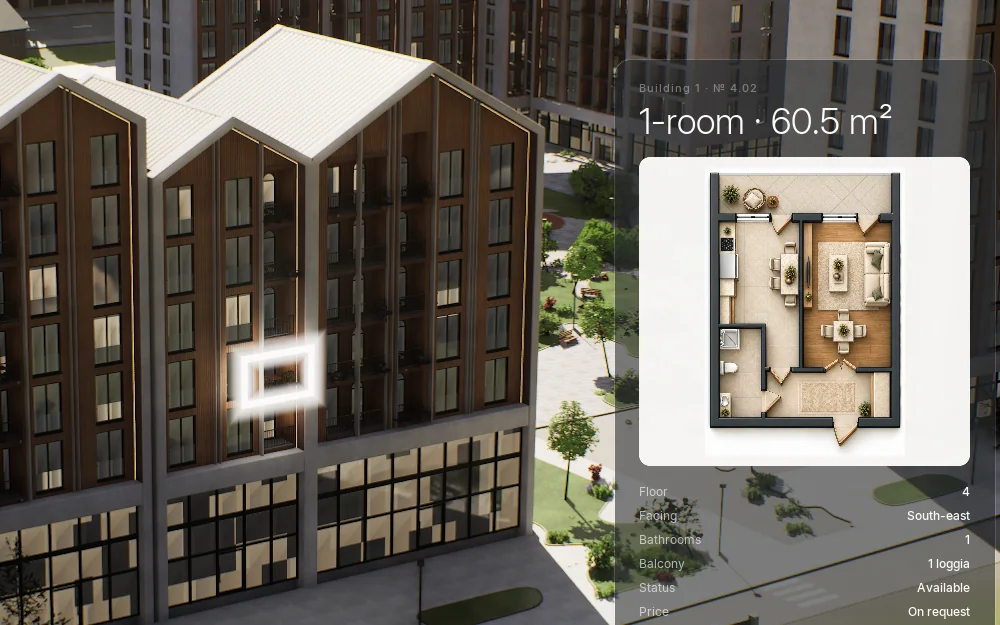
The same statuses on the building: the chosen apartment shows on the facade in a white frame, with its floor plan beside it. Unreal Engine 5, real time.
In Baku, Advertol builds 3D Master Plans for developers in Unreal Engine 5: a photoreal model of the whole project with apartment selection inside it. The buyer filters by building, rooms, area, floor and status, and the interface is in Azerbaijani, Russian and English. Statuses and prices are connected to the developer's sales sheet or CRM, and we set this up for each project. If you already have a grid, we show in a meeting how to connect it to the model. What goes into a 3D master plan is covered in a separate guide.
From Excel to a live grid: six steps
- Pick one master file. Close the other copies and tell the team there is only one source from now on.
- Fix the numbering. Block, floor and apartment numbers should match the architect's plan. The number on the website, in the contract and in the office must not differ.
- Write down the statuses. Agree on one page what each status means and who may change it.
- Decide how long a reservation lasts. And write down what happens when it expires.
- Keep prices in one place. The website, PDF and office screen take prices from the grid, and every change is logged with a date.
- Connect the CRM. Website enquiries arrive with the apartment number, so the manager knows what the buyer looked at. We explain how apartment selection works on a website in a website for a residential complex.
A grid for villas and cottage communities
In low-rise projects a table works badly: there are many houses, few units in each, and the buyer is choosing a plot, a road and neighbours. One user review on crmindex says Profitbase's Smart catalogue is less convenient for low-rise projects with many houses and few apartments (2 June 2021, crmindex reviews). For projects like these, a plot map and a 3D model work better. More in how to sell a villa community.
How we look at your grid in the meeting
Bring your Excel file, floor plans and master plan. In a 15-minute online meeting we look at three things: whether the numbering matches the plan, how statuses and reservations are kept, and through which channel buyers see the apartment. Then we tell you what you need: a ready-made tool, a CRM link or a 3D model. You may not need everything, and we will say so plainly.
If you want two renders for a banner or the cheapest option, a 3D Master Plan is not for you. Otherwise the plan and price arrive in writing after the meeting. Pick a time on the 3D Master Plan page.
Frequently asked questions
What is a unit availability grid?
It is a table of a building's apartments: rows are floors and columns are the apartments on each floor. Each cell holds the apartment's status, area, number of rooms and price. Developers use it to follow sales and avoid double bookings.
Can I keep the grid in Excel?
Yes, at the start of sales and with a single manager. As managers, offices and sales channels grow, Excel brings double bookings, stale prices and changes with no history. At that point it is time to move to a live table everyone sees at once.
What apartment statuses should we use?
In practice five are enough: "available", "reserved", "contract in progress", "sold" and "not released". The key rule: every reservation has an end date, and only the responsible person can mark a unit "sold".
How do I show the grid on a website?
As a table, through floor plans, or on the building's facade. For buyers the facade and a 3D model are the clearest, because they see where the apartment is and what the window looks out on. Either way, statuses must come from the same table.
What is the difference between a unit grid and a 3D master plan?
The grid is the sales team's table; the 3D master plan is the model the buyer sees. Both run on the same data: when an apartment is reserved in the office, the reservation shows in the model too. One does not replace the other; one connects to the other.