A developer can show a 3D model online in three ways: a pre-rendered video tour, a lightweight WebGL model that runs on the buyer's phone, or the full Unreal Engine application running on a powerful server and streamed to the browser as video (Pixel Streaming). For most projects the safest split is video and stills for ads, a light browser version for the website and the full Unreal app in the sales office. Pixel Streaming pays off when only a few people watch at once and picture quality matters more than server cost.
Key takeaways:
- A video tour opens on any phone and inside Instagram's in-app browser, but the buyer cannot move the camera.
- A WebGL model is drawn on the buyer's own device: it is interactive and needs no GPU server, but light and materials are simplified.
- Pixel Streaming brings full Unreal quality to the browser, but every session needs a GPU server: AWS estimated in 2022 about $408 a month for one server.
- Buyers who click an ad usually open the page on a phone, inside the Instagram app, so test every format there first.
- The soundest approach is one model with three outputs: video, browser version and office app all show the same apartment list.
The three options in one table
All three formats do the same job: they show a project that does not exist yet on a screen. The difference is who draws the picture: the studio in advance, the buyer's phone, or a server in the cloud. That decides quality, how it behaves on a phone and what it costs each month.
| Video tour and stills | WebGL (3D in the browser) | Pixel Streaming | |
|---|---|---|---|
| Who draws the picture | The studio, in advance | The buyer's phone or laptop | A GPU server in the cloud |
| Quality | Highest: every frame is rendered with time to spare | Medium: light and materials are simplified | Full Unreal quality, limited by the connection |
| What the buyer controls | Nothing, they just watch | Rotates the camera, picks a building and an apartment | Everything, like the office app |
| On a phone | Opens everywhere | Depends on model size and phone power | Needs a stable connection |
| Instagram's in-app browser | No problem | Must be tested | Must be tested |
| Running cost | Ordinary video hosting | Ordinary web hosting and file traffic | GPU hours for everyone watching at the same time |
| Best place | Ads, Instagram, YouTube | Project website, apartment picker | Remote meetings, exhibitions, premium presentations |
The main takeaway is that the formats do not replace each other. Each one works at a different moment of the sale, so choose by channel.
Video tour: the most reliable format for ads
A video tour is a set of frames the studio has calculated in advance. In Unreal Engine this is done with Movie Render Queue or its newer node-based version, Movie Render Graph, and the same model produces both high-quality stills and camera flights (Epic Games documentation).
The sales advantage of video is simple: it opens everywhere. Reels, stories, YouTube, a file sent on WhatsApp, the top of the website. The buyer downloads nothing and waits for nothing. In Azerbaijan, Instagram ads can reach an estimated 4.25 million people, or 54.4% of adults (DataReportal, Digital 2026). That is often where a buyer first meets a developer.
The weakness is just as clear: a video does not answer the buyer's own question. They want to see the view from the seventh floor, and the video takes them from the courtyard to the pool. Use video to create interest and let the website and the sales office answer the question about a specific apartment.
When you order video for ads, write the formats down in advance: vertical 9:16 for Reels and stories, 4:5 for the feed, 16:9 for the website and YouTube. When a horizontal camera flight is cropped to vertical later, half the building often falls out of the frame.
WebGL: a light version of the model on the buyer's phone
WebGL is the standard technology for drawing 3D graphics inside a browser. The model is loaded onto the website as files and the buyer's phone or laptop draws the picture. The server only delivers files, so even with a hundred people watching at once there is no GPU server to pay for; the cost is mostly file traffic.
The price is quality. A phone is no match for the computer in the sales office, so the browser version is prepared separately: the same buildings and the same apartment list, but lighter materials, simplified trees and pre-calculated light. The picture looks less like a photo than a render does, but the buyer can do the essential things: rotate the building, choose a floor and a side, open the floor plan.
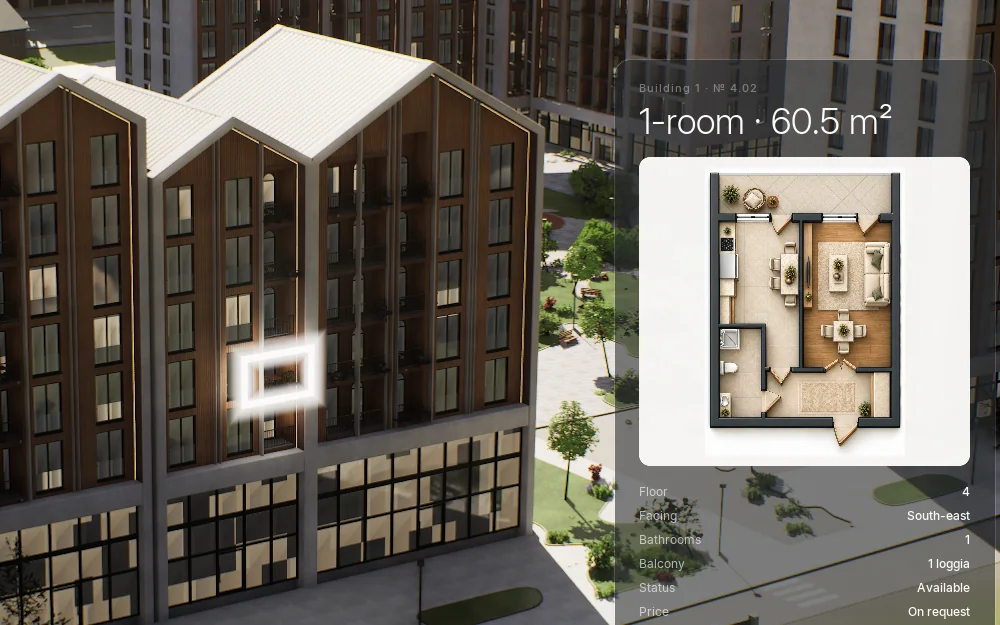
Real-time apartment picker in Unreal Engine 5: the apartment chosen in the filters lights up on the facade in a white frame and its floor-plan card opens.
For choosing an apartment this is usually enough. At that moment the buyer cares less about photoreal light than about "which way does this flat face, and how close is the next building". We describe how the picker works together with floor plans, prices, a mortgage calculator and a WhatsApp button in our article on residential complex websites.
Check three things in a WebGL model: how fast it opens on mobile data, whether it freezes on a mid-range Android phone, and whether the buyer still sees the apartment list while the 3D is loading. The last one matters most: if the model fails to load for any reason, the page must not stay empty.
What Pixel Streaming is and when it pays off
Pixel Streaming is an Unreal Engine feature: the application runs on a server with a graphics card and the buyer's browser receives a video stream. The buyer touches the screen, the command goes to the server, and the server draws a new frame and sends it back (Epic Games, Pixel Streaming hosting). The phone shows the same picture as the screen in the sales office: real light, full materials, every tree.
Three things decide the cost.
The server. AWS estimated a g4dn.xlarge server with a 250 GB disk in the us-east-1 region at about $408 a month (AWS GameTech blog, 1 June 2022). The figure is from 2022 and today's price will differ by region and plan, but it shows the scale: this is not ordinary website hosting.
Concurrent viewers. According to a third-party hosting guide, a standard setup runs a separate instance of the application for every viewer watching at the same time (abratabia.com). This is not an official Epic figure, but it is the safer way to plan: if a campaign sends dozens of people to the site at once, you need dozens of sessions, or buyers end up in a queue.
Maintenance. In UE 5.5 Epic deprecated the old matchmaker component, and the SFU is still experimental (source: the Epic document above). Someone has to monitor the servers, update them and manage the queue; this is not a one-off job.
So where does Pixel Streaming make sense? In a remote meeting, where the sales manager sends a link and both look at the model together. When a foreign buyer needs to see a premium project in full quality. At an exhibition with a screen but no powerful computer. In these cases there are few viewers and each session is worth a lot. For mass ad traffic it is, in our view, an expensive and risky choice: when a queue builds up, the buyer from the ad sees a waiting screen and leaves.
Where buyers come from and where they open it
Traffic decides the format before technology does. A developer's ads run mainly on Instagram, and Instagram opens links in its own in-app browser. So your model's first test will happen inside the Instagram app, not in Safari or Chrome.
Run this check yourself before you accept a website or a model:
- Open the ad link on your own phone from Instagram, on mobile data, not Wi-Fi.
- Test it on your sales team's phones: mid-range Android devices are closer to a real buyer's phone.
- Watch what the buyer sees while the model loads: an empty screen, or a picture and a "choose an apartment" button.
- Test on a weak connection: if the 3D arrives late, can the buyer still see the apartment list and floor plans?
The sales office is a different world. There is no dependence on the internet or on a phone, and there is a powerful computer and a large touch screen. This is where the full Unreal app runs: the sun is set to the site's real coordinates, morning, day and evening light switch with one tap, and one tap flies the camera to the pool or the playground. We cover the office scenario separately in the article on sales office touch screens.

The same courtyard in evening light, Unreal Engine 5, real time. In the office app the time of day changes with one tap.
One model, three outputs: our approach
In Baku, Advertol builds 3D Master Plans for developers in Unreal Engine 5: a real-time model of the whole project with every building, facade material, the courtyard and the surrounding streets, with an apartment picker inside. The same model gives three outputs: video and stills for ads, a light browser version for the website and the full app for the sales office. The interface is in Azerbaijani, Russian and English.
That all three outputs share the same data matters even more than the technology. Apartment statuses (available, reserved, sold) and prices are connected to the developer's sales sheet or CRM. An apartment sold in the office shows as sold on the website too. When a buyer calls about a flat they saw online and hears it was sold long ago, trust is gone on the first call.
An enquiry from the website lands in the CRM with the apartment number and the ad source. We send the outcome back to Meta through the Conversions API so that the ads learn which clicks became real buyers. Our demo project with 12 buildings and 410 apartments runs as an office app, a video tour and a browser version. We can work out together which combination your project needs in a 15-minute meeting.
We explain what Unreal Engine gives real-estate sales in a separate guide, and what is inside a 3D master plan in What is a 3D master plan.
Not every developer needs this system. If you need two stills for a banner, an ordinary visualization studio is enough and will cost less. If you are looking for the cheapest option, we are not the right fit.
Which one to choose: three questions
Three questions usually settle it.
- Where do buyers come from? If most traffic is from Instagram, video and stills work in the ads and a light WebGL version works on the website.
- How many people will watch at once? Many: WebGL. Few, with every view worth a lot (remote meetings, foreign buyers, the premium segment): Pixel Streaming is worth considering.
- Is there a sales office or an exhibition stand? If so, the full Unreal app runs on a touch screen and the same model serves all three channels.
In the meeting we ask about the size of the project, your sales channels and the materials you already have (master plan, floor plans, renders), then tell you plainly which outputs make sense. You can pick a time on the 3D Master Plan page.
Frequently asked questions
What is Pixel Streaming?
Pixel Streaming runs an Unreal Engine application on a GPU server in the cloud and sends the picture to the browser as a video stream. The buyer touches the screen on their phone and the server sends back the next frame. The quality is very close to the office app, but every concurrent viewer needs server capacity.
Does a 3D model on a website work on phones?
A video tour works on any phone. A WebGL model depends on the model size and the phone's power, so test it on a mid-range Android phone and inside Instagram's in-app browser. Pixel Streaming depends more on the internet connection than on the phone.
How much does Pixel Streaming cost?
The main cost is the GPU server. In 2022 AWS estimated about $408 a month for one g4dn.xlarge server in us-east-1; today's price differs by region and plan. The number of servers grows with the number of concurrent viewers, so plan this cost together with the ad budget.
Does a 3D model slow down a website?
Not if it is built properly: the page opens with a picture and the apartment list first, and the 3D loads in the background. The problem is a heavy model that the page forces to load before anything else. Then a buyer from an ad leaves before the model has opened.
How do you show a 3D model in an Instagram ad?
The ad itself does not contain an interactive model: video and stills are rendered from the model for Instagram. The ad brings the buyer to a page with the apartment picker, and the interactive part starts there. When the video and the website model come from the same 3D model, the buyer recognises on the site what they saw in the ad.